
I built a GUI tool in Python that generates pairwise test cases and exports them to CSV or Excel. It runs on both macOS and Windows.
Command-line tools like PICT are powerful, but writing an input file and running it from a terminal is a real barrier for non-engineers. The goal here was to reduce that to filling in a form and pressing a button.
This article was published in 2025 and revised in September 2026. The original version failed to explain an important caveat about the “coverage rate” feature: lowering that number destroys pairwise coverage.
Sponsored
What I built
| GUI | Tkinter (Python standard library) |
|---|---|
| Pairwise generation | allpairspy |
| Data handling | pandas |
| Excel I/O | openpyxl |
| Supported OS | macOS / Windows |
It does five things:
- Add and remove parameters and values through a form
- Generate pairwise test cases
- Reduce the number of generated cases (with an important caveat, explained below)
- Export results to CSV or Excel
- Import an existing CSV or Excel file and restore the parameters
Screenshots
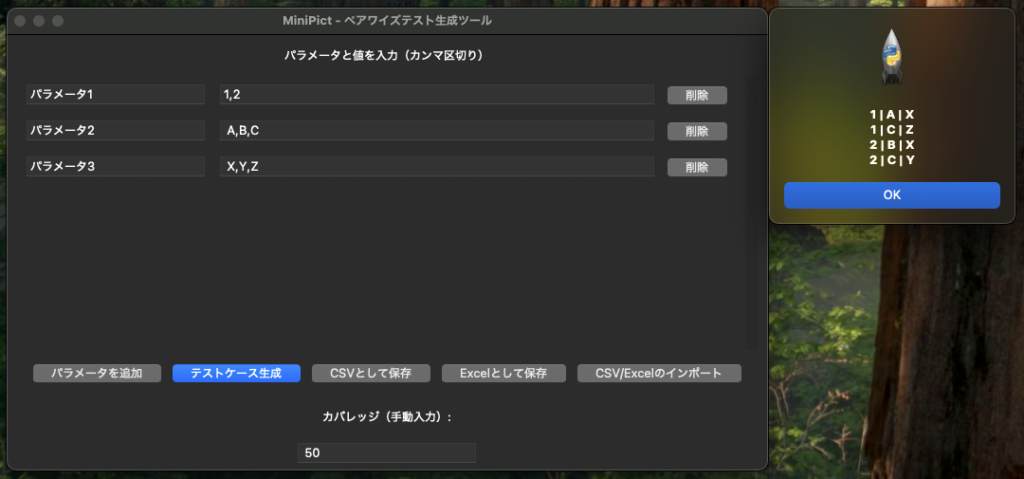
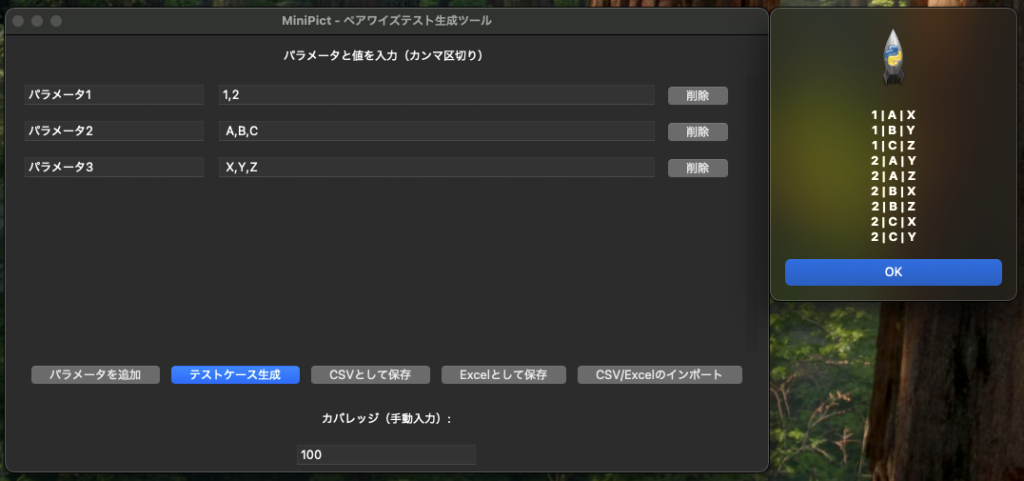
Enter each parameter’s values as a comma-separated list, press “Generate”, and the results appear in the table.
Sponsored
Source code
import tkinter as tk
from tkinter import ttk, filedialog, messagebox
import pandas as pd
from allpairspy import AllPairs
import openpyxl

class MiniPictApp(tk.Tk):
    def __init__(self):
        super().__init__()
        self.title("MiniPict - Pairwise Test Generation Tool")
        self.geometry("700x650")

        self.param_entries = []
        self.create_widgets()

    def create_widgets(self):
        lbl = tk.Label(self, text="Enter parameters and values (comma-separated)")
        lbl.pack(pady=10)

        frame = tk.Frame(self)
        frame.pack(expand=True, fill='both', padx=10)

        canvas = tk.Canvas(frame)
        scrollbar = ttk.Scrollbar(frame, orient="vertical", command=canvas.yview)
        scrollable_frame = tk.Frame(canvas)

        scrollable_frame.bind(
            "<Configure>",
            lambda e: canvas.configure(scrollregion=canvas.bbox("all"))
        )

        canvas.create_window((0, 0), window=scrollable_frame, anchor="nw")
        canvas.configure(yscrollcommand=scrollbar.set)

        canvas.pack(side="left", fill="both", expand=True)
        scrollbar.pack(side="right", fill="y")

        self.scrollable_frame = scrollable_frame

        button_frame = tk.Frame(self)
        button_frame.pack(pady=10)

        add_btn = ttk.Button(button_frame, text="Add Parameter", command=self.add_parameter)
        add_btn.pack(side='left', padx=5)

        generate_btn = ttk.Button(button_frame, text="Generate Test Cases", command=self.generate_test_cases)
        generate_btn.pack(side='left', padx=5)

        save_btn = ttk.Button(button_frame, text="Save as CSV", command=self.save_to_csv)
        save_btn.pack(side='left', padx=5)

        save_excel_btn = ttk.Button(button_frame, text="Save as Excel", command=self.save_to_excel)
        save_excel_btn.pack(side='left', padx=5)

        import_btn = ttk.Button(button_frame, text="Import CSV/Excel", command=self.import_values)
        import_btn.pack(side='left', padx=5)

        self.coverage_label = tk.Label(self, text="Coverage (manual input):")
        self.coverage_label.pack(pady=10)

        self.coverage_entry = ttk.Entry(self, width=20)
        self.coverage_entry.pack(pady=5)

        self.result = None

    def add_parameter(self):
        frame = tk.Frame(self.scrollable_frame)
        frame.pack(pady=5, anchor='w')

        label_entry = ttk.Entry(frame, width=20)
        label_entry.insert(0, f"Parameter {len(self.param_entries)+1}")
        label_entry.pack(side="left", padx=5)

        value_entry = ttk.Entry(frame, width=50)
        value_entry.insert(0, "Value1, Value2, Value3")
        value_entry.pack(side="left", padx=5)

        delete_btn = ttk.Button(frame, text="Delete", command=lambda: self.delete_parameter(frame))
        delete_btn.pack(side="left", padx=5)

        self.param_entries.append((label_entry, value_entry, frame))

    def delete_parameter(self, frame):
        for entry in self.param_entries:
            if entry[2] == frame:
                self.param_entries.remove(entry)
                break
        frame.destroy()

    def generate_test_cases(self):
        try:
            parameters = []
            headers = []

            for label_entry, value_entry, _ in self.param_entries:
                name = label_entry.get()
                values = [v.strip() for v in value_entry.get().split(",") if v.strip()]
                if not values:
                    raise ValueError(f"Values for {name} are empty")
                headers.append(name)
                parameters.append(values)

            manual_coverage = self.coverage_entry.get().strip()
            if manual_coverage:
                try:
                    manual_coverage = float(manual_coverage)
                    if not (0 <= manual_coverage <= 100):
                        raise ValueError("Please enter a coverage between 0 and 100")
                except ValueError:
                    messagebox.showerror("Error", "Please enter a number between 0 and 100 for coverage")
                    return
            else:
                manual_coverage = 100

            all_pairs = list(AllPairs(parameters))
            total_combinations = len(all_pairs)

            if manual_coverage == 100:
                pairs = all_pairs
            else:
                required_cases = int(total_combinations * (manual_coverage / 100))
                pairs = all_pairs[:required_cases]

            df = pd.DataFrame(pairs, columns=headers)
            df = df.sort_values(by=headers[:len(parameters)], ascending=True).reset_index(drop=True)

            self.result = df

            preview = "\n".join(df.head(10).astype(str).agg(" | ".join, axis=1).tolist())
            messagebox.showinfo("Generated Test Cases (First 10)", preview)

        except Exception as e:
            messagebox.showerror("Error", str(e))

    def save_to_csv(self):
        if self.result is None:
            messagebox.showwarning("Warning", "Please generate the test cases first.")
            return

        file_path = filedialog.asksaveasfilename(defaultextension=".csv",
                                                 filetypes=[("CSV files", "*.csv")])
        if file_path:
            self.result.to_csv(file_path, index=False)
            messagebox.showinfo("Save Complete", f"Saved to {file_path}")

    def save_to_excel(self):
        if self.result is None:
            messagebox.showwarning("Warning", "Please generate the test cases first.")
            return

        file_path = filedialog.asksaveasfilename(defaultextension=".xlsx",
                                                 filetypes=[("Excel files", "*.xlsx")])
        if file_path:
            with pd.ExcelWriter(file_path, engine='openpyxl') as writer:
                self.result.to_excel(writer, index=False, sheet_name='Test Cases')
            messagebox.showinfo("Save Complete", f"Saved to {file_path}")

    def import_values(self):
        file_path = filedialog.askopenfilename(filetypes=[("CSV files", "*.csv"),
                                                          ("Excel files", "*.xlsx")])
        if not file_path:
            return

        try:
            if file_path.endswith(".csv"):
                data = pd.read_csv(file_path)
            else:
                data = pd.read_excel(file_path)

            for idx, col in enumerate(data.columns):
                if idx >= len(self.param_entries):
                    self.add_parameter()
                self.param_entries[idx][1].delete(0, tk.END)
                self.param_entries[idx][1].insert(0, ", ".join(data[col].dropna().astype(str).tolist()))

            messagebox.showinfo("Import Complete", "File import completed.")
        except Exception as e:
            messagebox.showerror("Error", f"Failed to import file: {str(e)}")

if __name__ == "__main__":
    app = MiniPictApp()
    app.mainloop()
How the code works
The GUI (Tkinter)
Since the number of parameters has to be unbounded, I combined a Canvas with a Scrollbar to make a scrollable area.
Frame/Canvas/Scrollbarbuild the scrollable region- Each parameter row holds two
Entrywidgets (name and values) - Each row has a delete button so rows can be removed later
Tkinter ships with Python, but Homebrew’s Python needs python-tk installed separately. If it will not start, see how to fix the “_tkinter module not found” error.
Pairwise generation (allpairspy)
The generation itself is a single line.
from allpairspy import AllPairs
...
all_pairs = list(AllPairs(parameters))
parameters is a list of value lists, like this:
parameters = [
    ["Windows", "macOS", "iOS"],
    ["Chrome", "Safari"],
    ["Free", "Paid"],
]

for case in AllPairs(parameters):
    print(case)
Controlling the order
Results are sorted back into the order the parameters were entered.
df = df.sort_values(by=headers[:len(parameters)], ascending=True).reset_index(drop=True)
Without this, the output order is hard to read and hard to review.
CSV and Excel I/O
pandas handles all of it.
- Save as CSV:
to_csv() - Save as Excel:
to_excel()(requiresopenpyxl) - Load:
read_csv()/read_excel()
I added Excel support because test designs often have to be shared with people who are not engineers.
Sponsored
Lowering the “coverage rate” destroys coverage
This is the most important caveat, and the original version of this article did not explain it properly.
The tool has a feature that reduces the number of generated cases, which I originally called “coverage rate”. But setting it below 100 breaks the very premise of pairwise testing: that every two-factor combination appears at least once.
| Setting | What actually happens |
|---|---|
| 100 | Correct pairwise output. All pairs are covered |
| Below 100 | Keeps only part of the generated set. Some pairs are never covered |
“50% coverage” does not mean “half of the pairs are covered”. It simply takes the first portion of the generated list, and which pairs get dropped is not controlled at all.
If you use it, treat it this way:
- Always use 100 for real test design
- Below 100 is a stopgap for “we are out of time, run part of it”. It is not evidence of coverage
- If you must cut cases, keep the high-risk combinations rather than mechanically taking the first N
The reasoning behind pairwise testing is covered in the basics and practice of pairwise testing. The lower bound on case count is the product of the two factors with the most values, so once you drop below that, you can be certain coverage is gone.
Limits you hit in real work
Here is what the tool cannot do, which I only found out by building it.
You cannot declare constraints
This is the biggest practical gap. There is no way to exclude impossible combinations such as “iOS x Internet Explorer”.
allpairspy itself supports this via filter_func, so it can be added with a code change.
def is_valid(row):
    # Partial rows are passed in during generation, so check the length first
    if len(row) >= 2:
        os_name, browser = row[0], row[1]
        if os_name in ("iOS", "Android") and browser == "Edge":
            return False
    return True

for case in AllPairs(parameters, filter_func=is_valid):
    print(case)
filter_func receives incomplete rows while generation is still in progress. Indexing without checking the length first will raise IndexError.
You cannot pin combinations that must be included
There is no equivalent of PICT’s seeding. A major real-world usage pattern may simply not appear in the output, so the results need a human review pass.
No three-factor coverage
There is no equivalent of PICT’s /o:3. If a critical feature needs three-factor combinations, use PICT.
Library maintenance
The latest allpairspy release is 2.5.1 (July 2023), so it is not an actively developed library. It works fine, but if this is going to sit at the center of your workflow long term, a proven tool like PICT is the safer choice.
How to run it
Required libraries
pip install allpairspy pandas openpyxl
Run
python3 test.py
If it fails to start, check how to fix the “_tkinter module not found” error. Homebrew’s Python needs python-tk installed on top.
Summary
- Tkinter + allpairspy + pandas is enough to build a GUI pairwise generator
- CSV and Excel support lets you share test designs with non-engineers
- Setting “coverage rate” below 100 destroys pairwise coverage. Always use 100 for real design work
- Constraints can be added with
filter_func, but remember it receives partial rows - Pinned combinations and three-factor coverage are not supported
- Use PICT for serious work. This tool is for trying pairwise testing quickly
The real payoff of building it yourself is seeing exactly what the tool does and does not do. You stop taking the generated set on faith and start checking the coverage yourself.